

Yes, a free Pinterest scheduler exists in 2026. But "free" means four different things depending on which tool you're looking at. Pinterest's own native scheduler costs nothing. Several third-party tools offer a free tier with real limits. One-time automation tools skip the monthly fee entirely. And a handful of tools still ranked as "free" in older articles have quietly moved behind a paywall.
Whether you publish from WordPress or plan content in a spreadsheet, at least one of these options fits how you already work. The quick answer below shows which model gets you the most without paying a monthly fee.
Quick Answer: What's Actually Free, and What Isn't
Free forever: Pinterest native scheduler
Pinterest's built-in scheduler is free with any Business account. You get a queue of up to 10 pins and can schedule up to 30 days ahead.
Free forever: Buffer, Publer, and Metricool
These three tools have a genuine free plan with no trial timer.
- Buffer: 3 channels, 10 scheduled posts per channel
- Publer: 1 Pinterest account, 10 scheduled posts at a time
- Metricool: 1 profile per network, 20 posts per month
Free trial only: Later, Planoly, and SocialBee
These tools no longer offer a free plan. You get a 14-day trial, then a paid subscription starts. Many articles written before 2024 still list them as free.
No monthly fee: one-time automation
A third model skips the scheduler entirely. Tools like FlowRunAI's auto-posters cost $29 once and then run without a subscription. No queue management, no monthly bill.
Can You Schedule Pinterest Pins for Free?
Yes. You can schedule Pinterest pins for free through two paths: Pinterest's own built-in scheduler or a third-party tool with a free plan. Both work. Which one fits depends on how many pins you post and whether you need a content calendar beyond Pinterest itself.
The Native Pinterest Scheduler (Built-In and Free)
Pinterest has a built-in scheduler available to anyone with a Business account. Creating a Business account is free and takes a few minutes.
- Scheduling window: up to 30 days ahead
- Queue limit: 10 scheduled pins at a time
- Supported pin types: Standard Pins and Video Pins
- Not supported: Idea Pins
- Bulk scheduling: not available - you plan one pin at a time
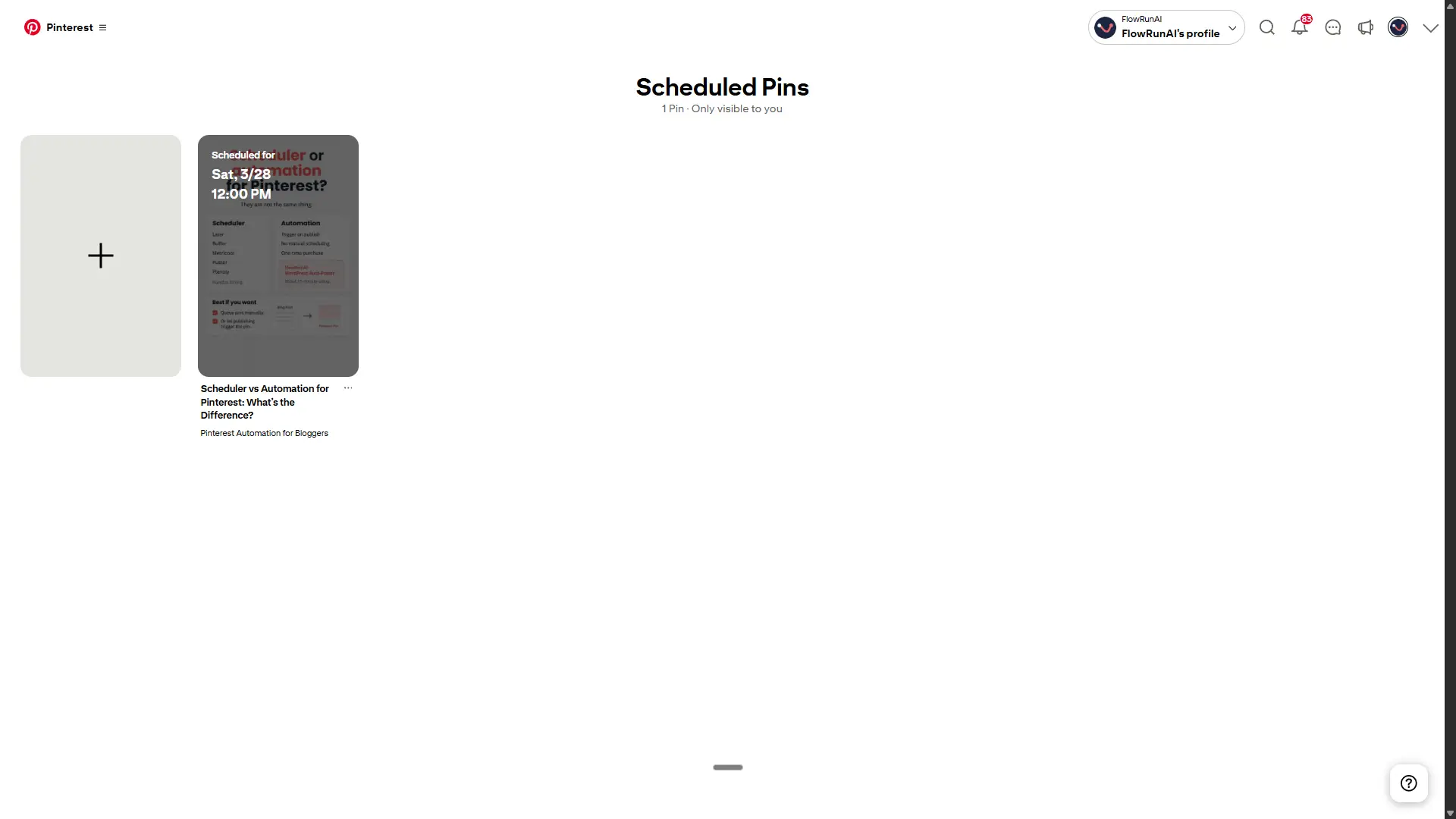
A quick note on the queue limit: some older blog posts mention 100 scheduled pins. Pinterest's own Help Center says 10. When there's a conflict, go with the official source.
For most beginners, the native scheduler is a solid starting point. It costs nothing, requires no third-party tool, and covers the basics. The limit that catches people off guard is the one-by-one scheduling. If you want to batch a month of pins in one sitting, you will hit that ceiling fast.
How to Schedule Pinterest Pins With the Native Scheduler
Scheduling a pin through Pinterest takes less than two minutes once your image and copy are ready.
- Go to your Pinterest Business account
- Click "Create" and build your pin - add your image, title, description, link, and board
- Toggle "Publish at a later date"
- Select your date and time
- Click "Schedule"
Keep in mind: the queue holds a maximum of 10 pins at a time. If your queue is full, you need to publish or delete an existing pin before you can schedule a new one.
The Catch: What the Native Scheduler Can't Do
- No bulk upload - you schedule one pin at a time
- No smart scheduling or best-time suggestions
- No cross-posting to other platforms
- No image editing after a pin is scheduled
- No support for Idea Pins
The queue limit is the real constraint. At 5 pins per day, you fill all 10 slots in two days. I tried batching pins for months ahead in one session - with a 10-pin queue, that just does not work. You're back the next week. And the week after.
The native scheduler works for occasional pinners. If you want to post consistently at any real volume, you will outgrow it quickly.
The Best Free Third-Party Pinterest Schedulers
A few third-party tools offer a free plan that does not expire. Not a trial, not a freemium tease. A free tier you can use indefinitely. Three tools stand out: Buffer, Publer, and Metricool. Each has real limits, but each is genuinely free to start.
Buffer: Best Free Option for Multi-Platform
Buffer's free plan is the most generous of the three. You connect up to 3 channels and keep 10 posts per channel in the queue at any time.
- Channels: 3 (Pinterest counts as one)
- Queue: 10 scheduled posts per channel
- Scheduling horizon: unlimited
- Extras included: Canva integration, AI assistant, cross-posting to other connected channels
- Not included: smart scheduling, board rotation, Pinterest-specific analytics
Buffer is the right pick if you are already managing Instagram or Facebook alongside Pinterest. The cross-posting and Canva integration make it a practical free hub for multi-platform creators. If Pinterest is your only channel and you want deeper pin analytics, Buffer's free plan will feel thin.
Tailwind Free Plan: Is It Actually Useful?
Tailwind gets recommended everywhere, so the free plan sounds like a safe starting point. Here is what you actually get:
- Posts per month: 5
- AI credits: 5
- Post Designs: 5 per month
- Accounts: 1
- Analytics: basic
Five posts per month is 1 to 2 pins per week. Pinterest recommends 1 to 25 pins per day for meaningful growth. At that volume, you are not building momentum - you are just testing the interface.
Use the Tailwind free plan to get familiar with how it works. Do not use it as your actual Pinterest strategy. A full breakdown of what actually holds up is in this Tailwind alternatives for Pinterest comparison.
Publer and Metricool: Worth Considering?
Both tools offer a genuine free plan and are worth a look if Buffer does not fit your setup.
Publer gives you 3 social accounts, 10 scheduled posts per account, bulk CSV upload, and post recycling on the free plan. One real threshold to know: Pinterest requires your account to have 100 or more followers, or a claimed domain, before Publer can post to it. New accounts may hit that wall before they see results.
Metricool covers 1 brand, 20 posts per month, and 30 days of analytics - Pinterest included. If you want basic performance data without paying, Metricool is the strongest free option for that.
Both work at low volumes. Neither scales past a few pins per week without upgrading.
Wait: Later and Planoly Are Not Free Anymore
Both Later and Planoly are still listed as free options in a lot of comparison articles. They are not. Both removed their free plans in 2024.
Later now starts at $18.75 per month on an annual plan, or $25 per month if you pay monthly. New users get a 14-day trial, nothing more.
Planoly starts at $14 per month annually, or $16 per month on a monthly plan. Same story - trial only, no permanent free tier.
SocialBee also falls into this category. No free plan, just a 14-day trial before billing starts.
If you are reading a roundup that lists these tools as free, check the publication date. Articles from 2022 or 2023 will often get this wrong. The pricing changes happened quietly and most older content was never updated. This is exactly why the date on any tool comparison matters.
What Free Plans Actually Give Up
Every free plan has a ceiling. Two limits show up fastest in practice: the queue cap and the post volume. Here is what those look like when you run the numbers.
The 10-Pin Queue Problem
Both the native Pinterest scheduler and Buffer's free plan cap your queue at 10 pins per channel. That sounds like enough until you run the numbers.
At 5 pins per day, your queue is full in 2 days. At 1 to 2 pins per day, you hit the ceiling in under a week. Once the queue is full, you are back to manual daily posting. That is exactly the problem you were trying to solve.
The queue limit is not a problem if you pin occasionally - once or twice a week at most. At that volume, 10 slots is plenty. The moment you try to build a real posting rhythm, the free tier stops keeping up.
Why 5 Posts a Month Won't Grow Your Pinterest Traffic
Five posts per month works out to 1 to 2 pins per week. Pinterest's algorithm rewards consistency and volume. At that frequency, your content rarely gets enough impressions to build momentum in your niche.
Pinterest recommends posting regularly to see meaningful reach. Most creators who generate consistent traffic pin several times per week at minimum. The guide on how often to pin on Pinterest breaks down what a working posting frequency looks like in practice.
A free plan is a reasonable way to test whether Pinterest works for your niche and content type. It is not a growth strategy. If your pins get traction at low volume, that is your signal to move to a setup that can keep up.
When a Paid Pinterest Scheduler Is Worth It
At some point, the time you spend working around free plan limits costs more than a paid tool would. Here are three situations where upgrading makes sense.
At What Volume Does a Paid Tool Pay Off?
At 5 pins per day, the native scheduler queue fills in 2 days. After that, you are back to posting manually every morning. That is the first sign a paid tool is worth considering.
A practical threshold: if you consistently plan more than 10 to 15 pins per month, the time you spend managing queue limits starts to add up. For monetized blogs, the math shifts quickly. An extra 300 to 500 monthly visitors from Pinterest covers the cost of most paid plans.
The tradeoffs between manual vs automated pinning come into sharper focus once you are posting at that frequency.
Tailwind Pricing in 2026: Monthly vs Annual
| Plan | Monthly price | Annual price | Posts per month |
|---|---|---|---|
| Free Forever | $0 | $0 | 5 |
| Pro | $29.99/mo | $17.99/mo | 150 |
| Advanced | $54.99/mo | $29.99/mo | 300 |
| Max | $99.99/mo | $49.99/mo | Unlimited |
Verified April 2026. Always check Tailwind's pricing page before purchasing.
The annual price is the benchmark most bloggers use. Paying monthly runs 40 to 50% more for the same plan. If you commit to Tailwind, the annual billing is the only price worth comparing.
Which Paid Plan Makes Sense for Bloggers?
If Pinterest is your primary traffic channel, Tailwind Pro annual at $17.99 per month is the logical pick. It is built specifically for Pinterest, includes smart scheduling, board rotation, and analytics that general tools do not offer.
If you are managing Instagram or Facebook alongside Pinterest, Buffer Essentials at around $5 per channel per month covers more ground for less.
For most solo bloggers who are serious about Pinterest, Tailwind Pro annual is the right starting point. The Pinterest-specific features justify the cost once you are posting consistently.
The Third Option: Pinterest Automation With No Monthly Fee
Almost every comparison article covers schedulers and paid tools. Very few mention a third model: pay once, then let the automation run. No subscription, no monthly invoice, no queue to manage. The pin goes live on its own when you publish or when your schedule says so.
What Is a One-Time Pinterest Automation Setup?
The model works like this: you pay once for a Make.com blueprint. After that, the automation runs on its own with no manual input from you.
The WordPress Pinterest Auto-Poster connects directly to your WordPress site. When you publish a post, it picks up the title, content, and link automatically. AI generates a pin title, description, image, and alt text. The pin is live on Pinterest in about 60 seconds. You do not touch it.
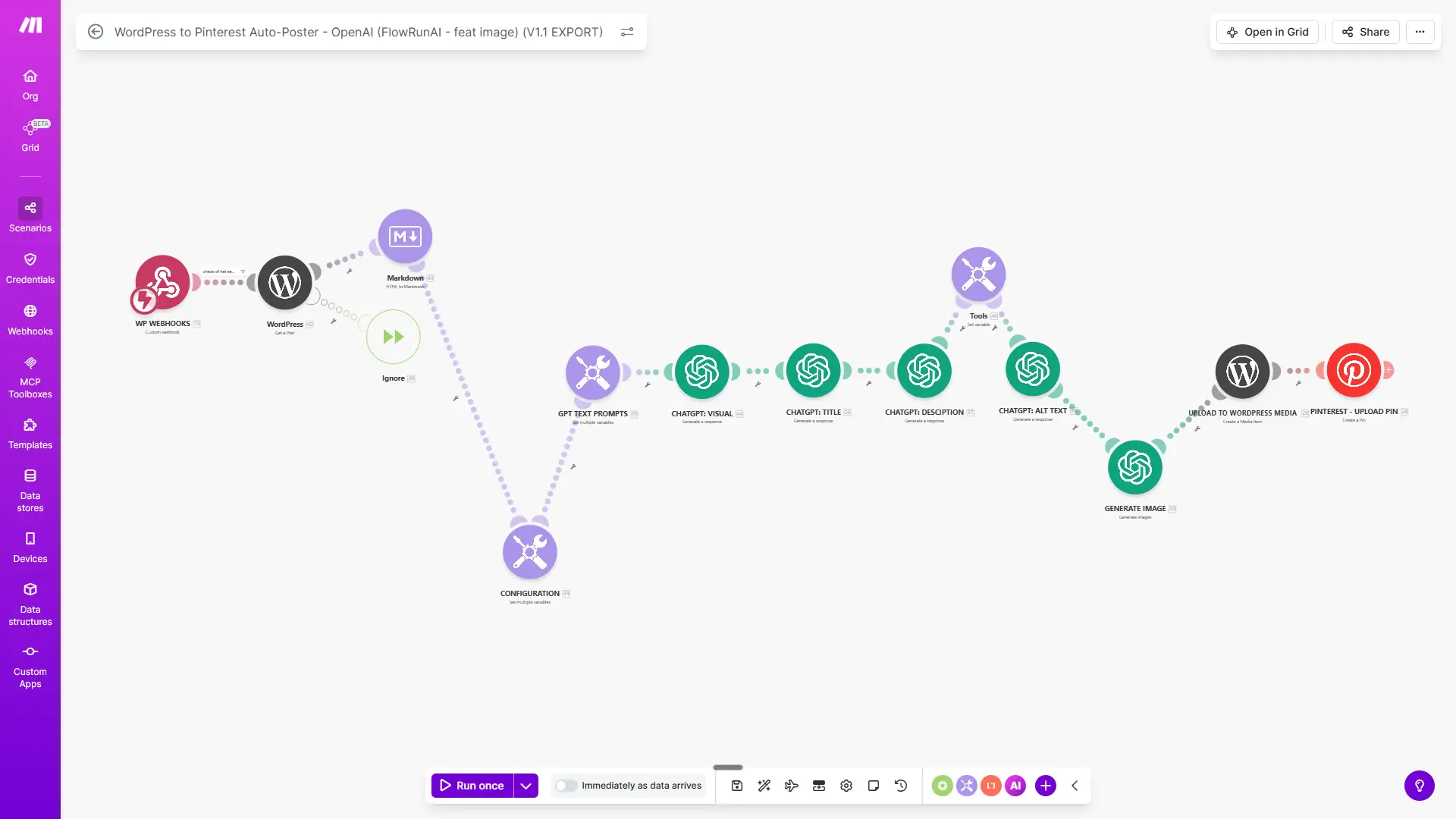
The setup takes about 15 minutes. The cost is $29 once. No subscription, no monthly fee, no queue to check. For bloggers who publish 2 to 4 posts per month and want zero extra work, that math is simple. For anyone who has tried to stay consistent on Pinterest and keeps falling off, this removes the step that always gets skipped.
Break-Even Analysis: One-Time vs Monthly Subscriptions
| Scenario A: WordPress blogger | Scenario B: Sheets planner | |
|---|---|---|
| Subscription alternative | Tailwind Pro annual: $17.99/mo | Later Starter annual: $18.75/mo |
| FlowRunAI one-time cost | $29 | $29 |
| Break-even point | Month 2 | Under 2 months |
| Year 1 saving | ~$187 | ~$196 |
| Year 2 saving (cumulative) | ~$403 | ~$421 |
One honest caveat: if you are comparing against Buffer Essentials at around $5 per month, the break-even takes closer to 6 months. Buffer is a real free-tier option and one of the cheapest paid upgrades available. The one-time model wins on total cost over time, but the gap is smaller when Buffer is the baseline.
Who Should Use a One-Time Setup, and Who Shouldn't
This setup fits you if you publish consistently from WordPress or plan content in batches, do not need multi-platform posting, and are willing to spend 15 minutes on setup once.
Three profiles land here most often: the batch planner who wants to load 30 pins into a Google Sheet and let the automation post on schedule, the creator without a blog who wants Pinterest running without building a website, and the solopreneur who needs to stop spending time on tasks that could run without them.
The Sheets to Pinterest Auto-Poster covers the second group directly. Add a row to your Google Sheet with a visual prompt and your keywords. The automation generates the image, writes the title and description, posts to Pinterest, and marks the row as done.
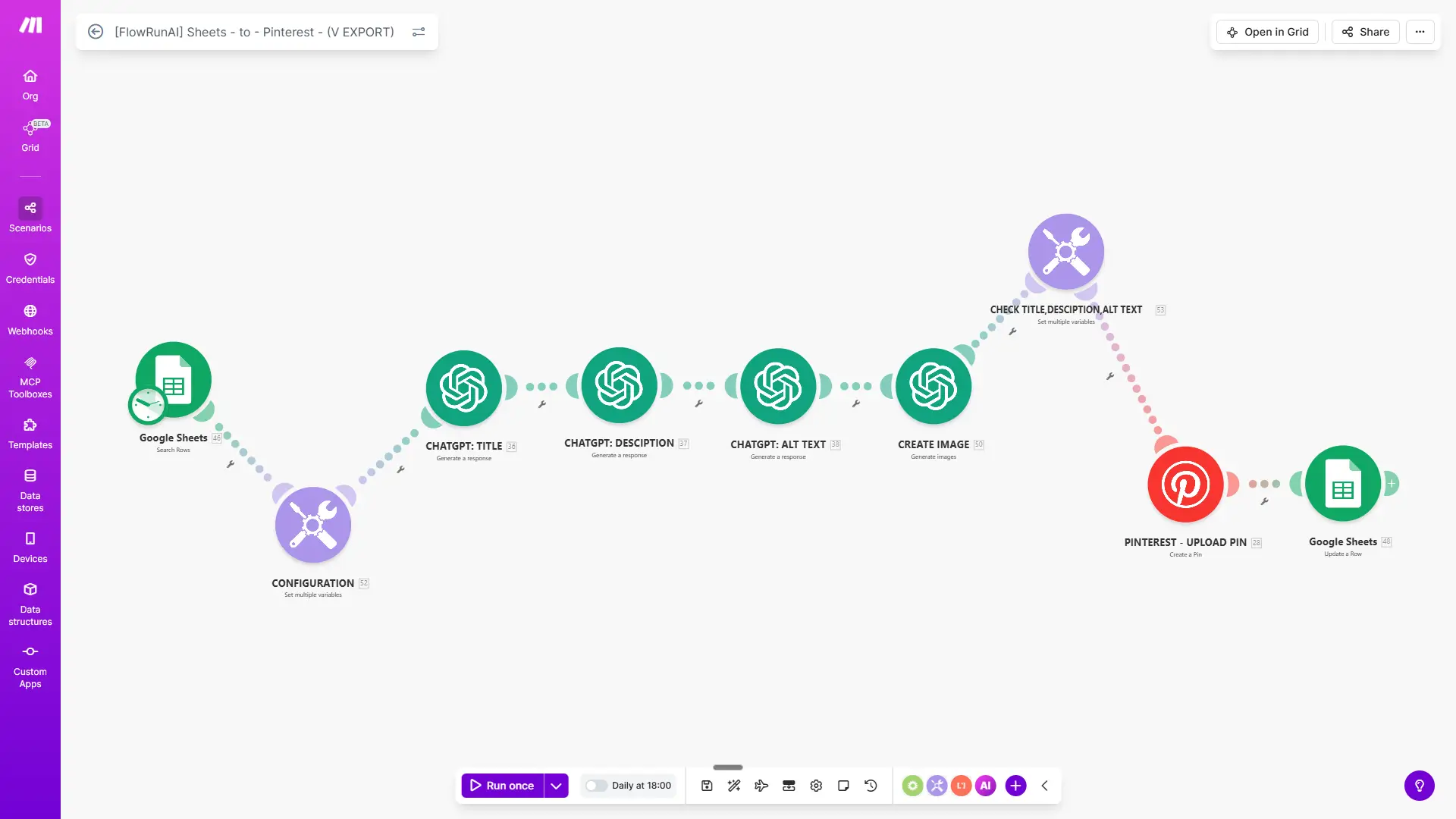
Make looks unfamiliar at first. Give it 15 minutes. My first pin was live on Pinterest before I finished my coffee. The interface is less complicated than it looks from the outside.
This is not the right fit for everyone. Skip the one-time model if:
- You are replacing a tool that costs $5 per month - the savings do not justify switching
- You need Pinterest analytics, smart scheduling, or board rotation
- You want to manage Instagram, Facebook, or other platforms from the same tool
Free vs Paid vs One-Time: Comparison Table
Here is every option from this article side by side.
| Tool | Monthly cost | Pins per month | AI image generation | WordPress integration | Google Sheets integration | Bulk scheduling | Analytics |
|---|---|---|---|---|---|---|---|
| Pinterest Native | $0 | 10 in queue | No | No | No | No | Basic |
| Buffer Free | $0 | 10 per channel | No | No | No | No | Basic |
| Tailwind Free | $0 | 5 | 5 credits/mo | No | No | No | Basic |
| Tailwind Pro | $17.99 (annual) | 150 | Yes | No | No | Yes | Full |
| FlowRunAI $29 | $0 after purchase | Unlimited | Yes | Yes | Yes | Via Sheets | No |
Pricing verified April 2026. Always check official pricing pages for current rates.
Is It Safe to Use Third-Party Pinterest Schedulers?
Yes, using a third-party Pinterest scheduler is safe if the tool connects through Pinterest's official API. Here is what that means in practice, and one scenario where you do need to be careful.
Official Partners vs Unauthorized Tools
Pinterest works with a set of approved partners who connect through the official API. In 2026 that list includes Tailwind, Buffer, Canva, and Picsart. Tools that use the official API carry no account risk. Pinterest knows they are there and explicitly supports them.
The cautionary example is BoardBooster, which was shut down in 2018 after Pinterest acted against tools that bypassed the API. That is the real risk: not schedulers in general, but tools that automate behaviour outside of what the API allows.
FlowRunAI's Make.com automation works as a user-initiated workflow through Pinterest's API. That puts it in line with how Pinterest expects third-party tools to operate. As for performance, Tailwind's own data from over a million pins suggests scheduled pins perform around 7% better on average than manually posted ones.
What the 2024 Spam Filter Wave Was Really About
A wave of Pinterest account suspensions in 2024 caused concern among bloggers using scheduling tools. The suspensions were not caused by schedulers. The trigger was pinning the same URL repeatedly in a short period. Pinterest's spam filters flag that pattern regardless of which tool you use.
Most affected accounts were restored quickly. There was no consistent link to any specific scheduler or automation tool. The lesson from 2024 is straightforward: space out pins that link to the same URL by at least 2 to 3 days. That single habit removes most of the spam filter risk.
How to Choose Based on Your Posting Volume
The right tool is mostly a volume decision. Here is what makes sense at each level.
- 1 to 3 pins per week: The native Pinterest scheduler covers this comfortably. Ten queue slots at this frequency last you weeks. No third-party tool needed.
- Around 1 pin per day: Buffer free or Publer free both hold up at this volume. If you publish from WordPress, FlowRunAI's Auto-Poster handles it automatically without touching the queue at all.
- 5 to 10 pins per day: The native scheduler queue fills in hours at this level. You need something that does not cap you. Tailwind Pro annual gives you 150 posts per month with smart scheduling. If you want a Pinterest scheduler with no monthly fee, FlowRunAI runs without a subscription at any volume once you have paid the one-time cost.
- Multiple blogs or brands: Tailwind Advanced or a higher Buffer tier is the practical choice. Both support multiple accounts from a single dashboard.
Volume is the first filter. After that, check whether you need analytics, multi-platform posting, or WordPress integration. Those narrow the field quickly. The best WordPress Pinterest automation tools comparison covers the WordPress-specific options in more detail.
Frequently Asked Questions
Can you schedule Pinterest pins for free?
Yes. Pinterest's native scheduler is free with a Business account and lets you schedule up to 30 days ahead with a maximum of 10 pins in the queue. Buffer's free plan is another genuine option, with up to 10 scheduled posts per channel. Both are free forever, not just trials. If you are looking for the best free Pinterest scheduler in 2026, these are the two worth starting with.
How many pins can you schedule on Pinterest natively?
According to Pinterest's official Help Center, you can have up to 10 pins scheduled at a time. Some third-party articles claim the limit is 100. Rely on Pinterest's official documentation, not older blog posts.
Does Tailwind have a free plan in 2026?
Yes, but it is very limited. The free plan gives you 5 posts per month across Pinterest, Instagram, and Facebook combined. That works out to roughly 1 to 2 pins per week, which is not enough to drive meaningful Pinterest traffic. Use it to test the interface, not as a working strategy.
Is Later still free for Pinterest scheduling?
No. Later removed its free plan in 2024. New users get a 14-day trial, after which billing starts. Paid plans begin at $18.75 per month billed annually. Articles written before 2024 that list Later as free are outdated.
Is Planoly still free for Pinterest?
No. Planoly no longer offers a free plan. Paid plans start at $14 per month billed annually. Many comparison articles still list Planoly as free. That information is outdated and has not been updated since the pricing change.
Are there Pinterest schedulers with no monthly fee?
Yes. Beyond Pinterest's native scheduler, one-time automation setups remove the subscription entirely. The FlowRunAI WordPress Auto-Poster and Sheets to Pinterest tool both cost $29 once and run without recurring fees. You cover the small OpenAI API cost per pin, around $0.05, but there is no monthly bill.
Will using a third-party Pinterest scheduler hurt my account?
Not if you use an officially approved Pinterest partner like Tailwind or Buffer. The risk comes from tools that bypass Pinterest's official API. BoardBooster is the clearest example: Pinterest shut it down in 2018 for exactly that reason. Stick to API-based tools and you have no account risk.
At what pinning volume does a paid scheduler start to make sense?
When you are consistently pinning more than 10 to 15 times per month and want to plan ahead. Tailwind Pro at $17.99 per month annually gives you 150 posts per month with smart scheduling. For most monetized blogs, an extra 300 to 500 monthly visitors from Pinterest covers that cost.
Last updated: April 2026